Showing posts with label presets. Show all posts

Wednesday, 11 January 2012

Cloud Industry for Cumulus Preset Bank

Looking for a few more free sounds for Computer Music's exclusive granular sampler plug-in, Cumulus? Then perhaps you should download Cloud Industry, a selection of presets by AbstractCats, a name perhaps familiar to Cumulus users: he was a major contributor of sample content and presets to the Cumulus Factory bank.

Cumulus is a granular sampler which radically transforms sample content by breaking it into tiny slithers of audio called grains and reorganizing them to form new sounds. Cumulus is capable of a wide ranges of timbres: from evolving atmospheric soundscapes; to organic physical textures. Up to eight Scenes can be created; a Scene corresponding to a particular sample position and set of synthesis parameters. Scenes can be played in realtime via MIDI, or arranged internally using the built-in sequencer.


Cumulus is available as part of CM Studio. The complete, full, unlimited version can be found on the cover-mounted DVD of any issue of Computer Music. Cumulus is available in VST, Audio Unit, RTAS, and standalone formats for Mac OS X, Linux, and Windows.

Sunday, 21 August 2011

Mac OS X plug-in interface resizing issues


It would appear that, with the most recent 1.6.0 releases, there is a problem with certain Mac OS X hosts, such as Digital Performer 7, and Resound's and Manifold's interface resizing, which occurs when the preset browser is open.

We are looking into this, but in the intermin, those affected by this bug can work-around it by switching the preset browser to a modal type dialog. To do this:

  • Open the corresponding configuration file, which will usually be placed at ~/Library/Preferences/Loomer/Resound.xml or ~/Library/Preferences/Loomer/Manifold.xml . 
  • Add the following line to the file:  <value name="ModalPresetBrowser" val="1">
  • Save and close the configuration file.

All new instances of the plug-in will now use the modal (pop-up) version of the browser.

We apologize for the inconvenience, and hope to have a fix out as soon as possible. I would be interested to hear if this problems also occurs in any other hosts, so by all means post details here of any resizing incompatibilities.

Thanks!

Thursday, 10 March 2011

Upgrade notice for Cubase users

Just a quick heads-up for Cubase users regarding an issue which can cause Loomer plug-ins saved in Cubase projects to reset to their default after upgrading said plug-in.

Other hosts are not affected. Presets saved externally are not affected.

This issue will only crop up if you:
  • Save a project using a plug-in that used the old, flat preset system.
  • Upgrade the plug-in to a version that users the new integrated preset browser.
By old flat preset system, we mean the one which looks like this:


And this is the new integrated preset browser:


To clarify, if you've updated from a version before any of these, to these versions or later, your plug-in configuration saved in the Cubase project will reset to default:
  • Aspect 1.6.0
  • Manifold 1.5.0
  • Shift 2.0.0
  • Resound 1.5.0
  • Sequent 1.1.0
  • String 1.2.3
If you've already upgraded to a plug-in using the new browser, further upgrades will not cause any problems.

Due to the nature of the bug, there is no workaround that we can implement in our code. The bug is with Cubase, and the ball is very much in Steinberg's court in terms of a fix. In the interim, we suggest:
  • Before you upgrade, save your presets out to native .xml or .fxp files.
  • Upgrade the plug-in(s).
  • Open your Cubase projects, load your saved presets into the affected plugins, save the projects, and never concern yourself about this bug again.
If you're a registered user who has already upgraded and would like a link to an older version of a plug-in so you can downgrade and save your presets or email us on the support email address listed here.

We apologize for any inconvenience this may have caused.

Friday, 17 September 2010

Zen and the art of preset sharing

Big Tick Audio Software have just released 1.0 of Zen, an online preset browsing wrapper. Zen, currently available on Windows, is a lightweight VSTi plugin which wraps existing plugin instruments, adding the ability to share and browse Zen's repository of online presets. Aspect support has recently been included, so feel free to grab Zen, and upload any presets you've created. (And once you've created an account, be sure to take a look at Big Tick's impressive range of previously-commercial-but-now-free older plugins.)

Tuesday, 27 July 2010

Aspect 1.6.1 released

We are pleased to announce the release of Aspect 1.6.1 for Mac OS X, Windows, and Linux. This release adds the following fixes and features:
  • Native 64-bit versions for Mac OS X Audio Unit, and Windows VST.
  • New built-in Preset Browser with support for xml, fxp, and fxb preset files.
  • Presets can now have meta-data, such as author name, notes, and tags. Use meta-data to search your preset library.
  • Hot-swap preset browsing: quickly step through and preview presets in context.
  • Various host compatibility fixes.
  • Audio-rate pitch modulation of Oscillator 1 from Oscillator 2 now works.
  • Sample & Hold module's latched value is now correctly reset when the the input source is removed.
  • Much faster GUI response.
  • Slight reduction in CPU usage on particularily complex presets.
  • Vastly reduced start-up time.
  • Clearer font rendering: a larger font is now used for menu items.
  • Additional and improved factory presets.
And here is the new Preset Browser (click for full-size):


Aspect 1.6.1 is available for immediate download from http://www.loomer.co.uk

Thursday, 3 June 2010

String 1.1 released: 64-bit / Effects Plugin

We are pleased to announce the release of String 1.1 - download the updated version here.

String 1.1, a free update for registered users, contains the following fixes and features:
  • Native 64-bit versions for Mac OS X Audio Unit, and Windows VST
  • Separate "Effects Only" plugin: use String's Effects as a general multi-fx unit
  • Phaser and Chorus now automatically disable themselves (saving CPU) when the plugin is idle
  • Each Layer now has an overall Volume control
  • Increased polyphony
  • Much faster GUI response  
  • Vastly reduced memory usage
  • Various compatibility fixes for certain hosts
  • Fixed bug where Delay Link status sometimes isn't persisted
  • Fixed minor audible click that could be heard when changing Chorus mode
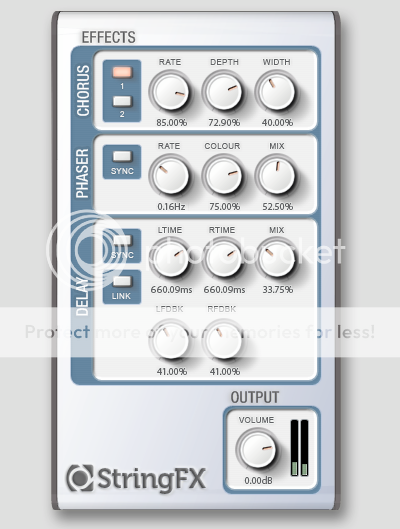
The effects only version, "StringFX",  is a separate plugin which can be used to process any external instruments with String's effects section:


And as a bonus, KVR's HunterKiller has kindly provided over 150 fantastic new presets for registered users of String - download them here. Many thanks to HunterKiller for the hard work he put into these awesome sounds.