Friday, 28 August 2009
Manifold audio samples
A number of people have commented on the lack of audio samples on our product pages. So, due to popular request, mp3s have been added to the Loomer Manifold page. Audio demos for Loomer Aspect and Loomer Resound will be coming shortly.


Tuesday, 25 August 2009
Aspect 1.4.2 released
Available as of now at the Loomer website, Aspect 1.4.2 is a minor update that contains a few fixes and enhancements:
- An uninstallation script is now available for the Mac OS X version. This script, when ran, will completely remove any installed Aspect components.
- Fixed an issue when the Aspect VST plugin is hosted by Reaper which could cause audio glitches when either changing programs, or editing Aspect parameters.
- Any notes playing when the host transport is restarted are now stopped.
Saturday, 22 August 2009
Shift: Diatonic, Pitch Shifted Delays
Loomer Shift, our new granular diatonic pitch shifter and delay effect has been released. As usual, it’s available for Windows, Mac OS X, and Linux, and comes in a numerous amount of plug-in formats (VST, Audio Unit, RTAS, and Standalone.)
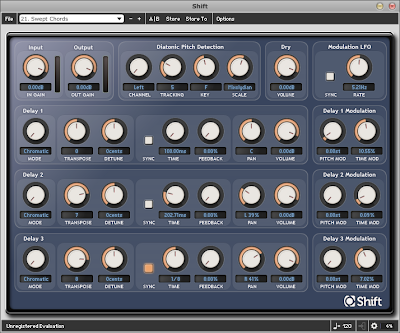
Shift has three independent delay lines, each one combining a fully fledged bucket brigade device style delay with a granular pitch shifter. Three different pitch shifting modes are available - in both Chromatic and Recursive modes the pitch shift amount is specified in semitones and cents, the difference between them being that in Chromatic mode the delay feeds back into itself, whilst in Recursive mode the delay feeds back into the pitch shifter. Finally, in Diatonic mode pitch shift is specified in diatonic intervals (eg, Unison, Second, Third) of a selected key and scale. The monophonic audio tracker then chooses the appropriate pitch shift in order to produce a harmony that is in key.
The free evaluation can be downloaded here, or, if you’re so inclined, a few choice audio examples can be heard here.
Wednesday, 12 August 2009
Resound 1.3.4 released
Resound, our vintage sounding delay unit, has been updated to 1.3.4. Download the latest version for Mac OS X, Windows, or Linux in VST, Audio Unit, RTAS Plugin or Standalone application format.
This new version has fixes for a few minor issues:
This new version has fixes for a few minor issues:
- Fixed pulsing noise that could occur when running at sample rates other than 44100Hz.
- Delay tails are now curbed when the host sequencer transport is restarted.
Wednesday, 8 July 2009
Aspect 1.4.0 released
Aspect has been updated to 1.4.0. This release adds a few minor fixes and features:
The sustain MIDI controller acts in a similar fashion to a sustain pedal on a piano, allowing notes to be sustained indefinitely whilst the sustain is on and releasing when sustain is switched off.
Lag Generator
The Lag Generator can now be used as an audio source. To route the Lag Generator audio into the main Aspect audio stream, choose Lag Generator as the audio input for either Filter1 or Filter2. When used on an audio source, the Lag Generator acts as a very simple lowpass filter with the cutoff frequency dropping as the Lag parameter increases.
Aspect is available as a download for Mac OS X, Windows, and Linux, in Audio Unit, RTAS, VST Plugin, and Standalone application format.
- Support for the sustain MIDI controller.
- Lag Generator component now only filters audio rate modulation sources when the Lag is set to above 0%.
- Lag Generator output can now be used as an audio source, as well as a modulation source.
The sustain MIDI controller acts in a similar fashion to a sustain pedal on a piano, allowing notes to be sustained indefinitely whilst the sustain is on and releasing when sustain is switched off.
Lag Generator
The Lag Generator can now be used as an audio source. To route the Lag Generator audio into the main Aspect audio stream, choose Lag Generator as the audio input for either Filter1 or Filter2. When used on an audio source, the Lag Generator acts as a very simple lowpass filter with the cutoff frequency dropping as the Lag parameter increases.
Aspect is available as a download for Mac OS X, Windows, and Linux, in Audio Unit, RTAS, VST Plugin, and Standalone application format.
Monday, 22 June 2009
Modular Synth Patching in Aspect, part 2
We continue from where we left off at the end Part 1; exploring the Patch and Modulation capabilities of the Aspect semi-modular synth. This article will cover the last three components in the Patch section; the Lag Generator, the Adders, and the Sample and Hold unit. Download Aspect for Windows, Mac OS X, and Linux, in Audio Unit, VST, and RTAS Plugins formats.
The Lag Generator Component
The Lag Generator slews the input Modulation Source, reducing the speed of changes. Similar to how Glissando causes note pitches to slide into one another, the Lag Generator can be used to make any Modulation Source slide. As the Lag Parameter increases, more time is taken for the Modulation Source to slide between changes.
Slewed Filter Cutoff
This example uses the Lag Generator to slew a Square waveform LFO which is modulating the Cutoff Frequency of a Lowpass Filter.
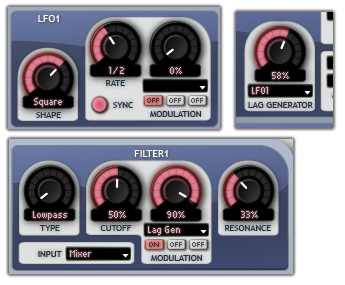 Hold down a note whilst slowly increasing the Lag Parameter. At low values of Lag, the Modulation Source still resembles a Square waveform. As Lag increases, the Square wave is softened and audible slides between the high and low values of the waveform can be heard. At higher values of Lag, the waveform starts to resemble a Sine, and eventually reaches a constant when the Lag is so much that any changes are too small to be heard.
Download the Slewed Filter Cutoff Patch here.
Emulating a Magnetic Tape Player
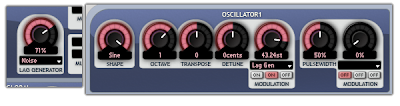
This example uses the Lag Generator to filter the White Noise Modulation Source. This creates a signal that slowly moves between random values (this type of movement is called Brownian Motion.) When used to modulate Pitch, this generates a meandering, detuned effect similar to the wow and flutter of an old tape recorder.
Download the patch here.
The Adder Components
The Adder components, Adder1 and Adder2, each take two Modulation Sources and produce a signal that is equal to the sum of the inputs. Because Parameters are already able to sum Modulation Sources (due to the fact that they all have three independent Modulation Slots), the Adder components may seem of little use. However, there are occasions when combining Modulation Sources outside of Parameter Modulation Slots is useful:
You may wish to connect several Modulation Sources to a component that only has one input connector (such as the Lag Generator, Sample & Hold, or Inverter components). Use an Adder to combine the Modulation Sources, and then connect this single Modulation Source to the chosen component.
If all of a Parameter's Modulation Slots have been assigned, and you need to add another Modulation Source, you can combine multiple Modulation Sources into a single one with an Adder. This single Modulation Source will allow two Modulation Sources to use up only one Modulation Slot in a Parameter.
The Adder can be used to combine signals to produce custom waveforms. This waveform can be fed directly into either Filter by choosing Adder1 or Adder2 from the Filter's input selector. The following example creates a waveform by subtracting one slightly detuned oscillator from the other:
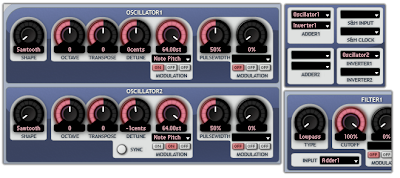 By summing an out-of-phase Sawtooth Oscillator with an inverted Sawtooth, we get a Pulse waveform. To add a bit of time-varying interest to the sound, an LFO will be used to add movement to one of the raw Oscillator sources:
Download the patch here.
The Sample and Hold Component
The purpose of the Sample and Hold (S&H) component is to keep a Modulation Source's value steady for a short time. The component takes two inputs, a Source and Clock; whenever the S&H Clock input source changes from a negative to a positive value (known as a zero-crossing), the current value of the S&H Input source will be taken and held steady until the next zero-crossing.
Here a Noise source is periodically sampled by the Sample and Hold component, with the sampling period controlled by a Sawtooth LFO connected to the Clock input. This creates a Modulation Source that changes to a different random value at the same rate as the LFO. To configure this in Aspect:
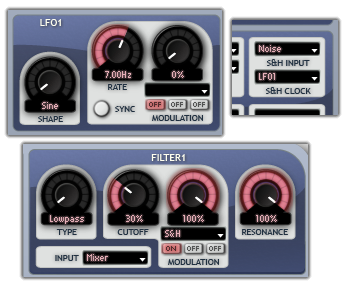 This S&H Noise to Filter creates a classic synth sound you've no doubt heard before:
Download the S&H Filter Patch here.
Sample Rate Reduction with the Sample and Hold Component
With Aspect, because there is no difference between Audio and Modulation signals the Sample and Hold component could also be used to sample an audio source at a specified clock rate. This distortion is known as Sample Rate Reduction, and produces a lo-fi, crunchy timbre.
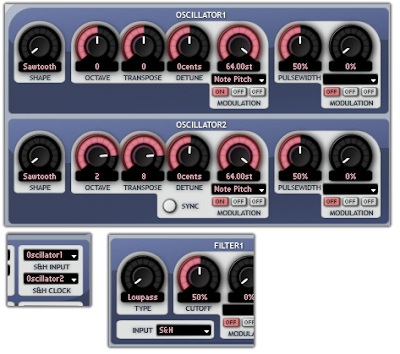 The pitch of Oscillator2, which is used to clock the Sample and Hold component, sets the Sample Rate of Oscillator1. Changing the Pitch of Oscillator2 changes the Sample Rate. At 2 Octaves and 8 Semitones, the Sample Rate is just over two and a half times the pitch of Oscillator1. This produces a particularly aggressive lo-fi metallic-sounding digital synth texture, which sounds like:
Download the Low Sample Rate Distortion patch here.
The Lag Generator Component
The Lag Generator slews the input Modulation Source, reducing the speed of changes. Similar to how Glissando causes note pitches to slide into one another, the Lag Generator can be used to make any Modulation Source slide. As the Lag Parameter increases, more time is taken for the Modulation Source to slide between changes.
Slewed Filter Cutoff
This example uses the Lag Generator to slew a Square waveform LFO which is modulating the Cutoff Frequency of a Lowpass Filter.
- Set LFO1 to Square shape, and Sync it to a rate of 1/2.
- Connect LFO1 to the Lag Generator.
- Change Filter1's Cutoff to about 50% and Resonance to about 30%.
- Connect the Lag Generator Modulation Source to the Cutoff Modulation, with a Depth of about 90%.
 Hold down a note whilst slowly increasing the Lag Parameter. At low values of Lag, the Modulation Source still resembles a Square waveform. As Lag increases, the Square wave is softened and audible slides between the high and low values of the waveform can be heard. At higher values of Lag, the waveform starts to resemble a Sine, and eventually reaches a constant when the Lag is so much that any changes are too small to be heard.
Download the Slewed Filter Cutoff Patch here.
Emulating a Magnetic Tape Player
This example uses the Lag Generator to filter the White Noise Modulation Source. This creates a signal that slowly moves between random values (this type of movement is called Brownian Motion.) When used to modulate Pitch, this generates a meandering, detuned effect similar to the wow and flutter of an old tape recorder.
- Connect the Noise Modulation Source to the Lag Generator.
- Set the Lag to about 70%.
- Oscillator1 should be a Sine shape, with a Pitch of 1 Octave up.
- Connect the Lag Generator Modulation Source to Oscillator1's Second Pitch Modulation Source with a Depth of about 40 semitones.

Download the patch here.
The Adder Components
The Adder components, Adder1 and Adder2, each take two Modulation Sources and produce a signal that is equal to the sum of the inputs. Because Parameters are already able to sum Modulation Sources (due to the fact that they all have three independent Modulation Slots), the Adder components may seem of little use. However, there are occasions when combining Modulation Sources outside of Parameter Modulation Slots is useful:
You may wish to connect several Modulation Sources to a component that only has one input connector (such as the Lag Generator, Sample & Hold, or Inverter components). Use an Adder to combine the Modulation Sources, and then connect this single Modulation Source to the chosen component.
If all of a Parameter's Modulation Slots have been assigned, and you need to add another Modulation Source, you can combine multiple Modulation Sources into a single one with an Adder. This single Modulation Source will allow two Modulation Sources to use up only one Modulation Slot in a Parameter.
The Adder can be used to combine signals to produce custom waveforms. This waveform can be fed directly into either Filter by choosing Adder1 or Adder2 from the Filter's input selector. The following example creates a waveform by subtracting one slightly detuned oscillator from the other:
- Detune Oscillator2 by -1 cent.
- Connect Oscillator2 to Inverter1.
- Link Oscillator1 and Inverter1 into Adder1's inputs.
- Choose Adder1 as the input to Filter1.
 By summing an out-of-phase Sawtooth Oscillator with an inverted Sawtooth, we get a Pulse waveform. To add a bit of time-varying interest to the sound, an LFO will be used to add movement to one of the raw Oscillator sources:
- Set LFO1 to Square, and Sync it to a rate of 1/4.
- Link LFO1 to a one of Oscillator2's spare Pitch Modulation Slots, and give it a Modulation Depth of 12.00 semitones (remember: holding Shift will allow finely grained changes to be made to controls.)
Download the patch here.
The Sample and Hold Component
The purpose of the Sample and Hold (S&H) component is to keep a Modulation Source's value steady for a short time. The component takes two inputs, a Source and Clock; whenever the S&H Clock input source changes from a negative to a positive value (known as a zero-crossing), the current value of the S&H Input source will be taken and held steady until the next zero-crossing.
Here a Noise source is periodically sampled by the Sample and Hold component, with the sampling period controlled by a Sawtooth LFO connected to the Clock input. This creates a Modulation Source that changes to a different random value at the same rate as the LFO. To configure this in Aspect:
- Connect the Noise Modulation Source to S&H Input.
- Connect LFO1 to S&H Clock.
- Set LFO1 to a rate of about 7Hz.
- Connect S&H to Filter1's first Modulation Slot with a Depth to 100%.
- Set Filter1's Cutoff to about 30% and Resonance to 100%.
 This S&H Noise to Filter creates a classic synth sound you've no doubt heard before:
Download the S&H Filter Patch here.
Sample Rate Reduction with the Sample and Hold Component
With Aspect, because there is no difference between Audio and Modulation signals the Sample and Hold component could also be used to sample an audio source at a specified clock rate. This distortion is known as Sample Rate Reduction, and produces a lo-fi, crunchy timbre.
- Connect Oscillator1 to the S&H Input, and Oscillator2 to the S&H Clock.
- Select S&H as the Input for Filter1.
- Tune Oscillator2 up by 2 Octaves, and Tranpose is to 8.
- Reduce the digital harshness slightly by setting Filter1 Cutoff to 50% and add a little bite by turning the Resonance to 50%.
 The pitch of Oscillator2, which is used to clock the Sample and Hold component, sets the Sample Rate of Oscillator1. Changing the Pitch of Oscillator2 changes the Sample Rate. At 2 Octaves and 8 Semitones, the Sample Rate is just over two and a half times the pitch of Oscillator1. This produces a particularly aggressive lo-fi metallic-sounding digital synth texture, which sounds like:
Download the Low Sample Rate Distortion patch here.
Sunday, 14 June 2009
Featured Artists: Protonica on Aspect
Our Featured Artists page is now up, together with praise for the Aspect semi-modular synth courtesy of our first featured artist, Piet Kaempfer from acclaimed Progressive Trance duo Protonica.
Piet says, "Aspect got my attention with its stylish, clear design. It's a genuine synth with its own character." Read what else Piet had to say about Aspect here.
Piet says, "Aspect got my attention with its stylish, clear design. It's a genuine synth with its own character." Read what else Piet had to say about Aspect here.
Subscribe to:
Posts (Atom)