Tuesday, 27 September 2011

Loomer Cumulus - Computer Music Exclusive


Cumulus is a granular sampler which radically transforms sample content by breaking it into tiny slithers of audio called grains and reorganizing them to form new sounds. Cumulus is capable of a wide ranges of timbres: from evolving atmospheric soundscapes; to organic physical textures.
Up to eight Scenes can be created; a Scene corresponding to a particular sample position and set of synthesis parameters. Scenes can be played in realtime via MIDI, or arranged internally using the built-in sequencer.
Cumulus is available free on the cover-mounted DVD of Computer Music magazine from issue 170 and onwards. Cumulus is supported on Mac OS X (VST, AU, RTAS, and Standalone), Windows (VST, RTAS, and Standalone), and Linux (VST, Standalone), and natively supports 64-bit for VST, Audio Unit, and Linux Standalone formats.


Monday, 19 September 2011

Aspect 1.7.7 critical bug-fix update


It seems like a rogue bug managed to slip under the radar in Aspect 1.7.6. I'd recommend anyone who downloaded it to update to Aspect 1.7.7.

This release fixes a critical bug in Aspect 1.7.6's audio synthesis engine which caused certain presets to sometimes have a transient gliding pitch at the beginning of a note. Which did admittedly add a certain flair to presets, but is, none-the-less, a bug which needed to be fixed!

Download Aspect 1.7.7 here.

Wednesday, 14 September 2011

Newsletter Mailing List

The Loomer mailing list is now active: sign up here. You'll receive the occasional email about new releases, as well as news on plug-in updates, and on anything else interesting we've been working on at Loomer HQ.

Rest assured, we hate spam as much as you do: we'll never sell, rent, or trade our list, and we've made it easy for you to unsubscribe at any time. You can read our privacy policy here.


Sign-up for the newsletter here.

Aspect 1.7.6 update for Mac OS X, Windows, and Linux


Aspect 1.7.6 for Mac OS X, Windows, and Linux is now available. This minor release adds the following improvements:
  • Native 64-bit VST plug-in for Mac OS X (64-bit VST support requires Mac OS X 10.6 or greater; 64-bit Audio Unit requires Mac OS X 10.5 or greater; all other formats require Mac OS X 10.4 or greater.) 
  • Preset searches are now multi-threaded. Preset browser can now immediately respond to user interaction, even whilst searching a massive preset library, or when browsing a folder containing a large number of presets. 
  • Preset meta data (ie, author name, notes, tags) is now correctly displayed after loading an .FXP based preset or restoring a saved project. 
  • Vastly improved CPU usage when recalculating DSP graph as a result of realtime re-wiring of a modular preset. 
  • Standalone application tempo can now be set to within two decimal places of accuracy. 
  • Fix for GUI freeze that could occur in certain Mac OS X VST hosts. 
  • Fix for LFOs being incorrectly reset every four bars when using the standalone application. 
  • Fix for minor issue which caused a changed preset to temporarily be reverted to its original state when previewing presets via the browser.
Download Aspect 1.7.6 here.

Saturday, 3 September 2011

Manifold and Resound 1.6.1 for Mac OS X


Manifold and Resound for Mac OS X have been updated to 1.6.1. These releases add a fix for an issue that causes the preset browser to become invisible when either Audio Unit plug-in is hosted by Digital Performer.

This is due to an incompatibility with Digital Performer's Carbon Audio Unit UI implementation. In these release, to force Digital Performer to use the plug-in's Cocoa Audio Unit UI :
  • Open the corresponding configuration file, ~/Library/Preferences/Loomer/Resound.xml or ~/Library/Preferences/Loomer/Manifold.xml . 
  • Add the following line to the file: <value name="CarbonAUInterface" val="0"> 
  • Save and close the configuration file.

All new instances of the Audio Unit plug-in will hide the legacy Carbon UI, forcing Digital Performer to use the more compatibile Cocoa UI.

Download Manifold and Resound 1.6.1 for Mac OS X here.

Sunday, 21 August 2011

Mac OS X plug-in interface resizing issues


It would appear that, with the most recent 1.6.0 releases, there is a problem with certain Mac OS X hosts, such as Digital Performer 7, and Resound's and Manifold's interface resizing, which occurs when the preset browser is open.

We are looking into this, but in the intermin, those affected by this bug can work-around it by switching the preset browser to a modal type dialog. To do this:

  • Open the corresponding configuration file, which will usually be placed at ~/Library/Preferences/Loomer/Resound.xml or ~/Library/Preferences/Loomer/Manifold.xml . 
  • Add the following line to the file:  <value name="ModalPresetBrowser" val="1">
  • Save and close the configuration file.

All new instances of the plug-in will now use the modal (pop-up) version of the browser.

We apologize for the inconvenience, and hope to have a fix out as soon as possible. I would be interested to hear if this problems also occurs in any other hosts, so by all means post details here of any resizing incompatibilities.

Thanks!

Tuesday, 16 August 2011

Manifold and Resound 1.6.0 updates released


Manifold 1.6.0 and Resound 1.6.0 for Mac OS X, Windows, and Linux are now available. Download the update versions here.

Manifold
Manifold is a software audio effect processor that enhances an audio signal, producing a fuller, livelier, bigger sound. Input signals are split into as many as 20 individual voices, each of which are detuned, placed around the stereo panorama, and recombined with stunning results. Flexible controls mean Manifold is capable of producing a wide range of effects; from subtle modulations that add interest to lifeless sounds, to extreme detuning that fattens the weakest of input sources.


Resound
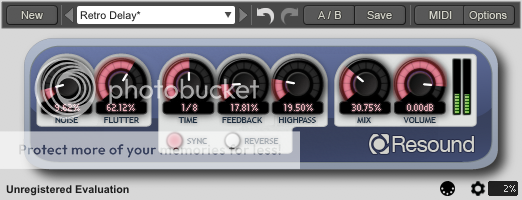
Resound is a software audio delay effect processor that emulates the sound and operation of vintage magnetic-tape echo units. Whilst not a direct copy of any one particular model, it takes features from several of the classic delay devices, and unites them into a convincing and pleasingly retro sounding effect.


Fixes and features in these release are as follows:

  • Native 64-bit VST plug-in for Mac OS X (64-bit VST support requires Mac OS X 10.6 or greater; 64-bit Audio Unit requires Mac OS X 10.5 or greater; all other formats require Mac OS X 10.4 or greater. ) 
  • Integrated undo and redo, with unlimited history size. 
  • [Resound] Split mechanical tape emulation controls into separate Noise and Flutter parameters. 
  • Category support in preset browser. 
  • MIDI Program Changes are now multi-threaded, and so will no longer potentially stall the audio synthesis. 
  • Fix for GUI freeze that could occur in certain Mac OS X VST hosts. 
  • Slightly reduced CPU usage and removed potential audio thread stall that could rarely occur when editing parameters. 
  • Windows RTAS plug-in is now installed to the correct location on 64-bit Windows operating systems. 
  • Fix for rare issue that stopped presets from loading in Linux Renoise when LADSPA plug-in support is enabled. 
  • Fix for issue that could cause some presets to be instantly marked as changed after opening them in Pro Tools or Maschine on Mac OS X. 
  • Factory presets now load significantly faster. 
  • Fix for crash (on both Windows and Linux) that could occur when 'space' is pressed when confirming the overwrite preset dialog. 
  • For Windows VST (32-bit and 64-bit), the preferences file can be placed alongside the DLL file to facilitate USB or portable installs. 
  • Preset meta data (ie, author name, notes, tags) is now correctly displayed after loading an .FXP based preset or restoring a saved project. 
  • VU meters now automatically reset their overload status after a few seconds. 
  • Various host compatibility fixes. 
  • PDF manual is now printer-friendly.